
LabAdviser/LabManager: Difference between revisions
| Line 10: | Line 10: | ||
==Front Page== | ==Front Page== | ||
The Frontpage presents information about | The Frontpage presents information about | ||
* Equipment | * Equipment Being Used | ||
* My Bookings Today | * My Bookings Today | ||
* Equipment in 'Service'/'Limited Use'/'Out of use' or Bypassed | * Equipment in 'Service'/'Limited Use'/'Out of use' or Bypassed | ||
* Equipment to be decommissioned | * Equipment to be decommissioned | ||
<BR> | |||
===Equipment Being Used=== | |||
This part shows equipment currently in use. Users own bookings are located at the top of the "Equipment Being Used"-list while equipment used by other users is listed in alphabetical order. You can directly access the process log as well as stop equipment usage - immediately ("Stop Now") or with a specified time delay ("Delayed Stop)". | |||
<br> | |||
===My Bookings Today=== | |||
Equipment usage can be started in different ways. One possibility is via the Frontpage under "My Bookings Today" by selecting "Go to Start". A new tab will open below with an overview of important status change information that should be checked before starting to use the equipment. There is also a direct link to the weekly calendar of the respective equipment. | |||
<br> | |||
===Equipment in 'Service'/'Limited Use'/'Out of use' or Bypassed=== | |||
<!-- | <!-- | ||
Revision as of 23:23, 2 July 2025
LabManager - Laboratory Information Management System of DTU Nanolab
LabManager is a laboratory information management system made by and for DTU Nanolab. It is vital for DTU Nanolab to keep track of user competencies, equipment booking and usage, status changes, and other activities related to laboratory use. It also hosts a digital copy of the equipment manuals and other relevant documents.
All users of our equipment (inside and outside the cleanroom) must have a profile in LabManager. Access is is granted as part of the introduction programme.
Below you can find information about various functions of LabManager. Please be aware that this page is under construction and not all functions will be explained here. Basics and most important functions of LabManager are explained in the introductory courses to the cleanroom or other labs of DTU Nanolab (Youtube Playlist for Labmanager and Labadviser). If you have problems finding specific information, please contact our Fabrication Support.
Basic Functions
Front Page
The Frontpage presents information about
- Equipment Being Used
- My Bookings Today
- Equipment in 'Service'/'Limited Use'/'Out of use' or Bypassed
- Equipment to be decommissioned
Equipment Being Used
This part shows equipment currently in use. Users own bookings are located at the top of the "Equipment Being Used"-list while equipment used by other users is listed in alphabetical order. You can directly access the process log as well as stop equipment usage - immediately ("Stop Now") or with a specified time delay ("Delayed Stop)".
My Bookings Today
Equipment usage can be started in different ways. One possibility is via the Frontpage under "My Bookings Today" by selecting "Go to Start". A new tab will open below with an overview of important status change information that should be checked before starting to use the equipment. There is also a direct link to the weekly calendar of the respective equipment.
Equipment in 'Service'/'Limited Use'/'Out of use' or Bypassed
Organizations/Projects
Get introduced to the way LabManager operates with different organizations and projects Organizations and Projects
Booking in LM
Find the LabManager "Booking rules" of each equipment by clicking "Info" on the Equipment List. After that, click "Booking rules".
How to create bookings is described in the Booking Guide
Competences and authorizations
Operating DTU Nanolabs complex equipment is not straightforward. Therefore we conduct training for all our users and keep track of who is allowed to operate which equipment. Read more - Competences and Authorizations.
Logbooks in LM
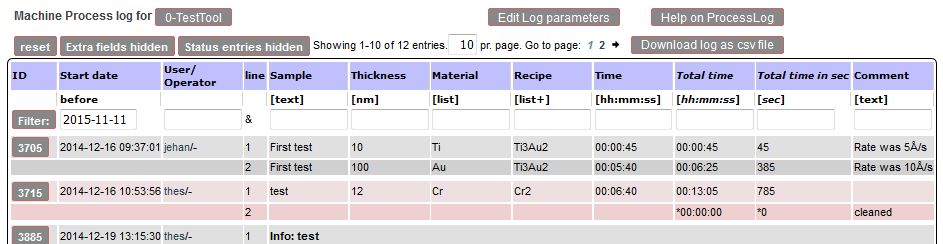
Equipment Cross Contamination
We have created a cross contamination sheet available in labmanager as a guideline regarding which materials are allowed to enter an equipment. It is also possible to show the cross contamination between two tools. You can find more information under Cross Contamination.
Equipment with LabManager Lock
Some equipment is equipped with a "LabManager Lock". This is an electronic switch that allows use of the tool only if you are logged in on LabManager.
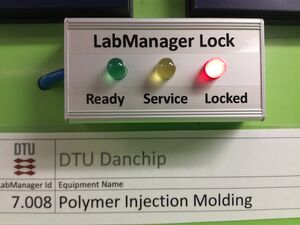
- RED means: No-one is logged in. You are not able to use the equipment. Some feature on the tool is disabled so that you cannot use it. What is disabled differs from equipment to equipment. It can be the monitor that does not turn on, the furnace will not load or the shutter not turn on.
- YELLOW means: The equipment is under service. You are under no circumstances allowed to use the equipment.
- GREEN means: Someone is logged in. You are able to use the equipment, but make sure it is you that is logged in.
Orderlines in LM
When you use the cleanroom, use equipment or buy wafers your project or department will be charged according to the DTU Nanolab pricebook. You can review the charges if you click the "Orderlines" in the LabManager main menu. Note for the cost indicated is the cost for commercial activities. The actual cost charged depends on what kind of project your are working on. See the DTU Nanolab pricebook for details. You have the possibility to correct the orderline e.g. if it is charged on the wrong project or you had forgot to log out of a tool. Click on the [Change] field to the right of the line. A new line opens where you can edit the amount, project, text or date. If you edit the amount the change has to be acknowledged by Nanolab first.
Purchase of wafers
You need to purchase the wafers that you use in the cleanroom. This is also done in LabManager.
Click on the [≡] to the top left on the page to bring out the full LabManager menu. Find the Shop sub-menu and select Wafers.
A list with wafers available for purchase opens.
- Find the type of wafer you want.
- Make sure all specifications are as wished.
- Check the stock and see if the are any comments
- Click the [Buy] button if everything is OK and
- fill out the form.
Data transfer from equipment
How to transfer data from some equipment in the clean room: Manual for remote.dtu.dk
General info
You can find important information about the clean room in LabManager here: Documents with General Information
As of September 2022 it contains:
 Safety Documents:
   Approved Chemicals
   Temporarily Approved Chemicals
   Procedure for safety approval of new and moved equipment (SI3.0.1.2)
   Emergency Plan (SI 3.2.1)
   Alarmsystemet (SI 3.2.3)
   Ansvarlige (SI 3.2.4)
   Procedure for approval of new chemical (SI 3.3.6)
   Safety policy on DTU Nanolab (SI 3.4.2)
   Generelle regler for arbejde i DTU Nanolabs renrum (SI 3.5.1.1)
   Rules for working in DTU Nanolab's cleanroom (SI 3.5.1.2)
   Rules for working with Chemistry at DTU Nanolab building 346/347 (SI 3.5.2.2)
 Cleanroom Documents:
   Booking Rules have moved to the individual equipment under Equipment->Info page
   Cleanroom Map
   Manual for remote.dtu.dk (data transfer)
State System Guide
Learn about the new status system in LabManager in the State System Guide
LabIntra Link
https://labintra.nanolab.dtu.dk/index.php?title=Main_Page/Application_Notes/CAPA#TEST_LA2