
LabAdviser/LabManager: Difference between revisions
| (62 intermediate revisions by 2 users not shown) | |||
| Line 5: | Line 5: | ||
All users of our equipment (inside and outside the cleanroom) must have a profile in LabManager. Access is is granted as part of the introduction programme. | All users of our equipment (inside and outside the cleanroom) must have a profile in LabManager. Access is is granted as part of the introduction programme. | ||
<br> <br> | <br> <br> | ||
Below you can find information about various functions of LabManager. Please be aware that this page is under construction and not all functions will be explained here. Basics and most important functions of LabManager are explained in the introductory courses to the cleanroom or other labs of DTU Nanolab ([https://www.youtube.com/watch?v=jC5soGfyrZc&list=PLjWVU97LayHA_ZKxvmNfTg1Bp53GX07ER Youtube Playlist for Labmanager and Labadviser]). If you have problems finding specific information, please contact our [mailto:nanolabsupport@nanolab.dtu.dk Fabrication Support]. | |||
= Basic Functions = | |||
==Front Page== | |||
The Frontpage presents information about | |||
* Equipment Being Used | |||
* My Bookings Today | |||
* Equipment in 'Service'/'Limited Use'/'Out of use' or Bypassed | |||
* Equipment to be decommissioned | |||
See details about the [[LabAdviser/LabManager/Front Page|Front Page]] | |||
<!-- | <!-- | ||
=== New Features in LabManager === | === New Features in LabManager === | ||
| Line 29: | Line 40: | ||
=== Organizations/Projects === | === Organizations/Projects === | ||
Get introduced to the way LabManager operates with different organizations and projects [[LabAdviser/LabManager/Organizations and Projects|Organizations and Projects]] | Get introduced to the way LabManager operates with different organizations and projects [[LabAdviser/LabManager/Organizations and Projects|Organizations and Projects]] | ||
===Labs in LabManager=== | |||
DTU Nanolab is comprised of several labs and access to each lab requires an intro course. Find the intro courses on our web page: | |||
[https://www.nanolab.dtu.dk/access/ https://www.nanolab.dtu.dk/access/ ] | |||
[https://labmanager.dtu.dk/function.php?module=Machine&view=dclist Equipment List] in LabManager showns all equipment, but other views only shows equipment in the selected labs. Follow this small [[LabAdviser/LabManager/Guide - select the proper laboratories |guide ]] to select labs. | |||
=== Booking in LM === | === Booking in LM === | ||
| Line 42: | Line 60: | ||
=== Competences and authorizations === | === Competences and authorizations === | ||
Operating DTU Nanolabs complex equipment is not straightforward. Therefore we conduct training for all our users and keep track of who is allowed to operate which equipment. Read more - [[LabAdviser/LabManager/Competences and Authorizations|Competences and Authorizations]]. | Operating DTU Nanolabs complex equipment is not straightforward. Therefore we conduct training for all our users and keep track of who is allowed to operate which equipment. Read more - [[LabAdviser/LabManager/Competences and Authorizations|Competences and Authorizations]]. | ||
=== Orderlines in LM === | |||
When you use the cleanroom, use equipment or buy wafers your project or department will be charged according to the DTU Nanolab pricebook. You can review the charges if you click the "Orderlines" in the LabManager main menu. Note for the cost indicated is the cost for commercial activities. The actual cost charged depends on what kind of project your are working on. See the DTU Nanolab pricebook for details. | |||
You have the possibility to [[LabAdviser/LabManager/Guide - change orderlines |correct the orderline ]] e.g. if it is charged on the wrong project or you had forgot to log out of a tool. | |||
<!--Click on the [Change] field to the right of the line. A new line opens where you can edit the amount, project, text or date. If you edit the amount the change has to be acknowledged by Nanolab first. | |||
===Change orderlines=== | |||
Lab activities are registered in LabManager orderlines. If you forget to stop your equipment usage - or an orderline is incorrect for another reason - you can request a change.--> | |||
=== Logbooks in LM === | === Logbooks in LM === | ||
| Line 49: | Line 77: | ||
=== Equipment Cross Contamination === | === Equipment Cross Contamination === | ||
We have created a cross contamination sheet available in labmanager as a guideline regarding which materials are allowed to enter an equipment. It is also possible to show the cross contamination between two tools. You can find more information under [[Specific Process Knowledge/Cross Contamination|'''Cross Contamination''']]. | We have created a cross contamination sheet available in labmanager as a guideline regarding which materials are allowed to enter an equipment. It is also possible to show the cross contamination between two tools. You can find more information under [[Specific Process Knowledge/Cross Contamination|'''Cross Contamination''']]. | ||
<!--old presentation (below) has been integrated into the labadviser page about "cross contamination": Specific Process Knowledge/Cross Contamination | <!--old presentation (below) has been integrated into the labadviser page about "cross contamination": Specific Process Knowledge/Cross Contamination | ||
| Line 64: | Line 90: | ||
*GREEN means: Someone is logged in. You are able to use the equipment, but make sure it is you that is logged in. | *GREEN means: Someone is logged in. You are able to use the equipment, but make sure it is you that is logged in. | ||
= | <div style="clear:both;"></div> | ||
=== Purchase of wafers === | === Purchase of wafers === | ||
| Line 82: | Line 107: | ||
* fill out the form. | * fill out the form. | ||
=== Data transfer from equipment === | <!--=== Data transfer from equipment === | ||
How to transfer data from some equipment in the clean room: | How to transfer data from some equipment in the clean room: | ||
[http://labmanager.dtu.dk/d4Show.php?id=3514| Manual for remote.dtu.dk] | [http://labmanager.dtu.dk/d4Show.php?id=3514| Manual for remote.dtu.dk]--> | ||
=== General info === | === General info === | ||
| Line 91: | Line 116: | ||
You can find important information about the clean room in LabManager here: [http://labmanager.dtu.dk/function.php?module=Machine&view=generalinfo&page_id=64| Documents with General Information] | You can find important information about the clean room in LabManager here: [http://labmanager.dtu.dk/function.php?module=Machine&view=generalinfo&page_id=64| Documents with General Information] | ||
As of September 2022 it contains: | <!--As of September 2022 it contains: | ||
Safety Documents: | Safety Documents: | ||
| Line 109: | Line 134: | ||
Booking Rules have moved to the individual equipment under Equipment->Info page | Booking Rules have moved to the individual equipment under Equipment->Info page | ||
Cleanroom Map | Cleanroom Map | ||
Manual for remote.dtu.dk (data transfer) | Manual for remote.dtu.dk (data transfer)--> | ||
=== State System Guide === | |||
Learn about the new status system in LabManager in the [[LabAdviser/LabManager/State System Guide|State System Guide]] | Learn about the new status system in LabManager in the [[LabAdviser/LabManager/State System Guide|State System Guide]] | ||
= | = = | ||
=== LabIntra Link (Staff) === | |||
https://labintra.nanolab.dtu.dk/index.php?title=Main_Page/Application_Notes/ | [https://labintra.nanolab.dtu.dk/index.php?title=Main_Page/Application_Notes/LabManager_Guides LabIntra] | ||
Latest revision as of 11:13, 9 October 2026
LabManager - Laboratory Information Management System of DTU Nanolab
LabManager is a laboratory information management system made by and for DTU Nanolab. It is vital for DTU Nanolab to keep track of user competencies, equipment booking and usage, status changes, and other activities related to laboratory use. It also hosts a digital copy of the equipment manuals and other relevant documents.
All users of our equipment (inside and outside the cleanroom) must have a profile in LabManager. Access is is granted as part of the introduction programme.
Below you can find information about various functions of LabManager. Please be aware that this page is under construction and not all functions will be explained here. Basics and most important functions of LabManager are explained in the introductory courses to the cleanroom or other labs of DTU Nanolab (Youtube Playlist for Labmanager and Labadviser). If you have problems finding specific information, please contact our Fabrication Support.
Basic Functions
Front Page
The Frontpage presents information about
- Equipment Being Used
- My Bookings Today
- Equipment in 'Service'/'Limited Use'/'Out of use' or Bypassed
- Equipment to be decommissioned
See details about the Front Page
Organizations/Projects
Get introduced to the way LabManager operates with different organizations and projects Organizations and Projects
Labs in LabManager
DTU Nanolab is comprised of several labs and access to each lab requires an intro course. Find the intro courses on our web page:
https://www.nanolab.dtu.dk/access/
Equipment List in LabManager showns all equipment, but other views only shows equipment in the selected labs. Follow this small guide to select labs.
Booking in LM
Find the LabManager "Booking rules" of each equipment by clicking "Info" on the Equipment List. After that, click "Booking rules".
How to create bookings is described in the Booking Guide
Competences and authorizations
Operating DTU Nanolabs complex equipment is not straightforward. Therefore we conduct training for all our users and keep track of who is allowed to operate which equipment. Read more - Competences and Authorizations.
Orderlines in LM
When you use the cleanroom, use equipment or buy wafers your project or department will be charged according to the DTU Nanolab pricebook. You can review the charges if you click the "Orderlines" in the LabManager main menu. Note for the cost indicated is the cost for commercial activities. The actual cost charged depends on what kind of project your are working on. See the DTU Nanolab pricebook for details.
You have the possibility to correct the orderline e.g. if it is charged on the wrong project or you had forgot to log out of a tool.
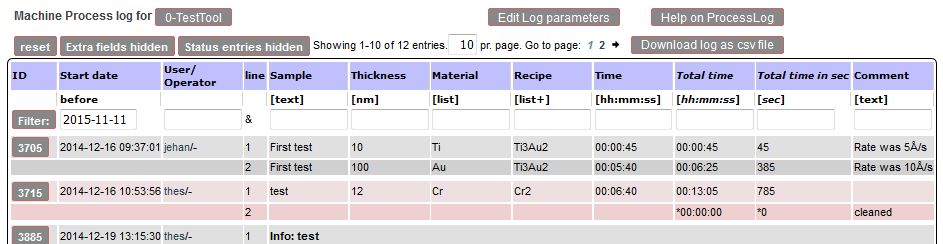
Logbooks in LM
Equipment Cross Contamination
We have created a cross contamination sheet available in labmanager as a guideline regarding which materials are allowed to enter an equipment. It is also possible to show the cross contamination between two tools. You can find more information under Cross Contamination.
Equipment with LabManager Lock
Some equipment is equipped with a "LabManager Lock". This is an electronic switch that allows use of the tool only if you are logged in on LabManager.
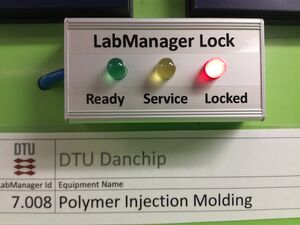
- RED means: No-one is logged in. You are not able to use the equipment. Some feature on the tool is disabled so that you cannot use it. What is disabled differs from equipment to equipment. It can be the monitor that does not turn on, the furnace will not load or the shutter not turn on.
- YELLOW means: The equipment is under service. You are under no circumstances allowed to use the equipment.
- GREEN means: Someone is logged in. You are able to use the equipment, but make sure it is you that is logged in.
Purchase of wafers
You need to purchase the wafers that you use in the cleanroom. This is also done in LabManager.
Click on the [≡] to the top left on the page to bring out the full LabManager menu. Find the Shop sub-menu and select Wafers.
A list with wafers available for purchase opens.
- Find the type of wafer you want.
- Make sure all specifications are as wished.
- Check the stock and see if the are any comments
- Click the [Buy] button if everything is OK and
- fill out the form.
General info
You can find important information about the clean room in LabManager here: Documents with General Information
State System Guide
Learn about the new status system in LabManager in the State System Guide