
Specific Process Knowledge/Characterization/XPS/Processing/Basics/2highres: Difference between revisions
No edit summary |
|||
| (8 intermediate revisions by the same user not shown) | |||
| Line 1: | Line 1: | ||
<!--Checked for updates on 30/7-2018 - ok/jmli --> | |||
<!--Checked for updates on 24/8-2021. ok/ jmli--> | |||
'''Feedback to this page''': '''[mailto:labadviser@danchip.dtu.dk?Subject=Feed%20back%20from%20page%20http://labadviser.danchip.dtu.dk/index.php?title=Specific_Process_Knowledge/Characterization/XPS/Processing/Basics/2highres click here]''' | '''Feedback to this page''': '''[mailto:labadviser@danchip.dtu.dk?Subject=Feed%20back%20from%20page%20http://labadviser.danchip.dtu.dk/index.php?title=Specific_Process_Knowledge/Characterization/XPS/Processing/Basics/2highres click here]''' | ||
<!--Checked for updates on 9/5-2023 - ok/jmli --> | |||
{{Contentbydryetch}} | |||
<!--Checked for updates on 4/9-2025 - ok/jmli --> | |||
== Selecting high resolution spectra for peak fitting == | == Selecting high resolution spectra for peak fitting == | ||
| Line 6: | Line 10: | ||
The analysis of the data from [[Specific Process Knowledge/Characterization/XPS/Processing/Basics/1intro#anchor_1introbottom|here]] is continued. | The analysis of the data from [[Specific Process Knowledge/Characterization/XPS/Processing/Basics/1intro#anchor_1introbottom|here]] is continued. | ||
Open a new data grid and drag the four sets of spectra into each quadrant as seen below. | Open a new data grid and drag the four sets of spectra into each quadrant as seen below. From these four sets of spectra a peak table will be made from which the quantification calculated. Each data grid contains a peak table and it is therefore essential that the peak table obtained from the survey spectra does not get mixed with the one from the high resolution spectra. | ||
[[File:XPS-basics10.jpg|700px]] | [[File:XPS-basics10.jpg|700px]] | ||
| Line 109: | Line 113: | ||
# Right click inside the table and select 'Propagate Selected Constraints/Values..' as shown below. | # Right click inside the table and select 'Propagate Selected Constraints/Values..' as shown below. | ||
# Select 'All Columns' and 'Constraints and Values' | # Select 'All Columns' and 'Constraints and Values' | ||
[[File:XPS-basics19a1.jpg|500px]] | |||
[[File:XPS-basics19b.jpg|300px]] | |||
Before applying the constraints to the fitting of all the levels, it may be a good idea to rename the peaks. Here, it makes good sense to apply the names 'Bulk' and 'Oxide'. | |||
[[File:Si2p fit1.jpg|500px]] | |||
Then, | |||
# Click the 'Peak Fitting' button, select 'Fit All Levels' in the 'Fit Peaks'. | # Click the 'Peak Fitting' button, select 'Fit All Levels' in the 'Fit Peaks'. | ||
# Click 'Accept' when the fitting routine has completed. | # Click 'Accept' when the fitting routine has completed. | ||
The result is that we have fitted all etch levels of the Si2p peak. Since silicon is not the only element in the sample, we need to apply the same procedures to the other core levels. | |||
The analysis continues <span>[[Specific_Process_Knowledge/Characterization/XPS/Processing/Basics/3fitting#top|'''here''']]</span>. | |||
Latest revision as of 10:36, 4 September 2025
Feedback to this page: click here Unless otherwise stated, the content of this page was created by the dry etch group at DTU Nanolab
Selecting high resolution spectra for peak fitting
The analysis of the data from here is continued.
Open a new data grid and drag the four sets of spectra into each quadrant as seen below. From these four sets of spectra a peak table will be made from which the quantification calculated. Each data grid contains a peak table and it is therefore essential that the peak table obtained from the survey spectra does not get mixed with the one from the high resolution spectra.

Scroll up or down through the etch levels of one spectrum by using the scroll button (either etch level or etch time). If several spectra are selected simultaneously by pressing SHIFT or CTRL while clicking on the spectra in the four quadrant view, you watch the evolution of the spectra together.
To analyze a single spectrum, select and maximize it. If you are unfamiliar with what to expect in a spectrum of the element in question, open XPS Knowledge View and select the element from the Periodic Table. This will provide very useful information. Also, before adding peaks to the spectrum, it is a good idea consider what you know about the sample. Here, we know that the sample has ALD deposited layers of ZnO and CuZn on top of a silicon substrate. One would therefore expect to see bulk silicon provided we sputter deep enough and oxidized silicon from the native oxide. Therefore, scroll to an etch level where, preferably, both the oxidized Si2p and the bulk silicon Si2p are visible. In this case, it is etch level 35.
-
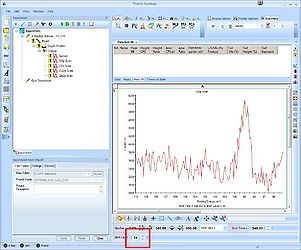 Etch level 34: The oxide peak is barely visible.
 -
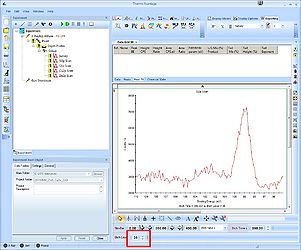 Etch level 35: Both the oxide and the bulk peak are visible and clearly separated.
 -
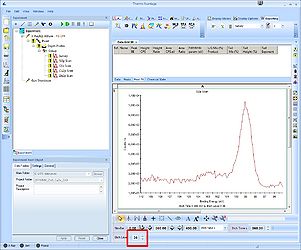 Etch level 36: The separation between the peaks is less visible.


Click the 'Peak Fit' button in the top to enable peak fitting on all etch levels.

Peak fitting
A window labelled 'Peak Fitting' with a suggestion to a peak (see red square) will pop up. Usually the peak is correctly identified, in this case it's a Si2p doublet. The window has two tabs - first we will set up the 'Add Fitted Peak'.

In the spectrum the location and width of the peak are shown with bars (see blue square) - you can modify the location and the width using the mouse. Here we start out with the bulk peak as shown. Once this peak is fixed we will add the Si2p oxide peak.
The green square holds the information on how to correct for the background. In this case we will use the 'Shirley' background with default settings.
Click 'Add Doublet' once and the Si2p doublet will be added.

A table with peak fitting parameters emerge above the spectrum. The Si2p spin-orbit couple is labelled Scan A. The details of the fitting is not discussed yet.
Also, in the upper part of the spectrum the residuals of the fitting are shown.
To add the oxide peak, move the centre bar onto the oxide peak (this is why it is a good idea to have both peaks in the same spectrum) - in this case at around 102.8 eV binding energy.
Cick 'Add Doublet' to add the oxide peak.

Swithc to the other tab labelled 'Fit Peaks' in the 'Peak Fitting' window. Here, a button labelled 'Fit All Levels' will apply the fitting parameters to all levels (supposing several etch levels are available). Upon completion of the fitting routine, press 'Accept' and 'Ok'.
Verify correctness of fitting routine
What looks good in one spectrum, however, may not necessarily look good in another. Click the 'Open Experiment/Instrument And Properties View' button to remove the properties view and enlarge the 'Peak Fit' table. Now scroll through the different etch levels and notice how the peaks dance back and forth in the spectrum.

In the spectrum above (Etch level 0), the two doublets slided apart. With only background signal to adjust to, the fitting routine found a minimum with peaks in each end of the spectrum. Below, with a large and pure bulk Si2p spectrum at etch level 48, the doublets lie on top of each other.

This fitting is clearly wrong and we need to apply some constraints on some of the parameters. Scroll back to an etch level where all peaks are visible, in this case etch level 35, see image above.
Change fitting constraints
The Peak Fit table is shown below. The two Si2p spin-orbit doublets (the bulk and the oxide) are referred to as Scan A and B. The various fitting parameters for each of the four peaks are shown in the table along with their constraints. Under each peak is a row with the constraints (in bold) that are to be applied to the parameters.

Going through some of the constraints, one notices that:
| Constraint | Marked in table above | Notation | Detail |
|---|---|---|---|
| Fixed | No | Fixed | A number will fix the parameter at a certain value |
| Range | Yellow square | value1:value2 | Fixes the parameter between value1 and value2 |
| Fix to another parameter | Green square | A*1 | Fixes the parameter to another parameter; here reference A (first column) |
| Fix to another parameter with a range of freedom | Red square | A+0.63(±0.1) | Fixes the distance between the two peaks in the spin-orbit doublet to a range of 0.53 eV to 0.73 eV. |
To correct the faulty fitting, two new constraints (marked in the table by a blue square) have been applied. The top one fixes the bulk peak binding energy in the range 98 to 100 eV and the bottom one fixes the oxide peak to a 2 eV wide energy range 3.5 eV above the bulk peak. Applying a constraint to a parameter is simple done by writing (using the right notation, of course) in the table - removing is done by deleting.
To apply the constraints on all etch levels (if several levels are available) one has to
- Click in the upper left corner of the 'Peak Fit' table to select all values and constraints.
- Right click inside the table and select 'Propagate Selected Constraints/Values..' as shown below.
- Select 'All Columns' and 'Constraints and Values'


Before applying the constraints to the fitting of all the levels, it may be a good idea to rename the peaks. Here, it makes good sense to apply the names 'Bulk' and 'Oxide'.

Then,
- Click the 'Peak Fitting' button, select 'Fit All Levels' in the 'Fit Peaks'.
- Click 'Accept' when the fitting routine has completed.
The result is that we have fitted all etch levels of the Si2p peak. Since silicon is not the only element in the sample, we need to apply the same procedures to the other core levels.
The analysis continues here.